Integrato
Advanced AI chat assistants, side by side
Integrato is a self-hosted platform for running several chat assistants side by side. Each one has its own system prompt, its own markdown knowledge base, its own model and its own list of users — nothing crosses between them. Conversations and remembered facts are stored per user and per assistant. A chatbot can be text, image, speech in or speech out.
Models run through OpenRouter, so you bring your own key and can switch provider without touching code.
Four kinds of chatbot
Every chatbot has a type. The type decides which models can be chosen, what the user sends, what comes back, and which settings the admin sees — settings that would do nothing are left out.
Text → text An ordinary chatbot that answers in Markdown
- The user sends
- A message
- The user gets
- A streamed answer, with its cost shown underneath
- The admin sets
- Model, reasoning depth, sampling, answer language
- Web search with an include or exclude domain list, and cited knowledge-base sources.
- Memory across conversations, and summaries of long threads, each switched on per chatbot.
- Users can keep their own documents, including PDFs converted to Markdown, that the chatbot reads.
- Anonymization and EU-only routing, described under privacy below.
Text → image Describe a picture and get one back
- The user sends
- A description
- The user gets
- The picture, kept private to that user
- The admin sets
- Model and aspect ratio
Only models that can draw are offered. A new image chatbot starts on Gemini 3.1 Flash Image. Generated pictures are stored once and are only served to the person who made them.
Speech → text Upload a recording and get the words
- The user sends
- A WAV or MP3 recording
- The user gets
- The transcript as text
- The admin sets
- Model
Dedicated transcribers such as AssemblyAI, Fish Audio and Whisper are offered next to chat models that accept audio, and a new chatbot starts on AssemblyAI. Recordings can be about 6 MB, and transcribers are billed per second of audio.
Anonymization does not apply here: it rewrites text, and this chatbot is sent audio.
Text → speech Type a text and hear it read aloud
- The user sends
- A text
- The user gets
- Audio to replay and download
- The admin sets
- Model, voice and language
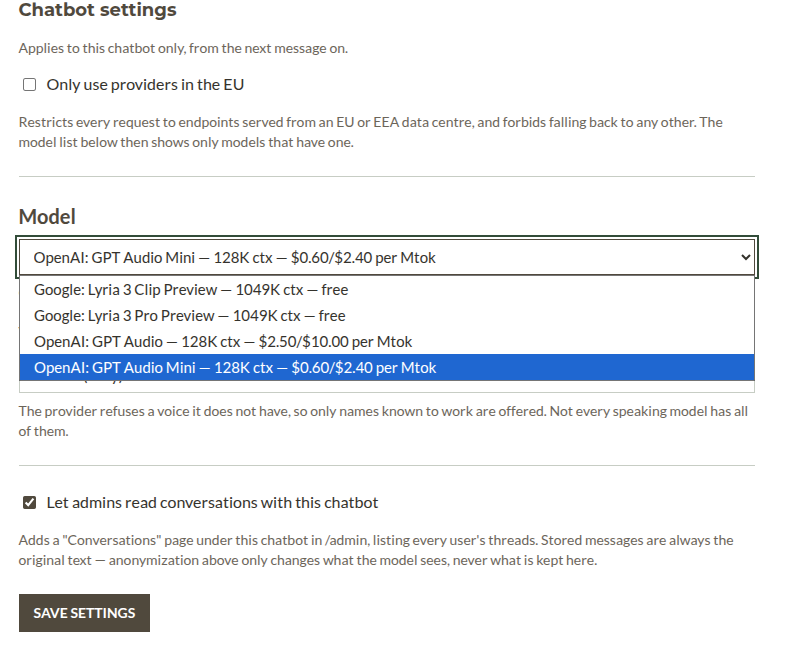
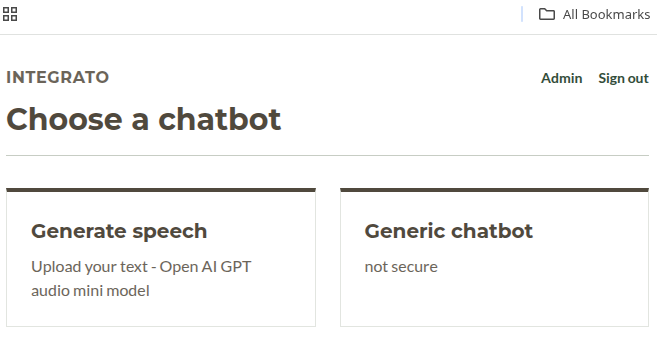
The chatbot reads the text word for word, in the language it was written in, instead of replying to it. A new speech chatbot starts on GPT Audio Mini.
Built for someone running more than one assistant
Everything is managed from one admin area: who may sign in, which assistants they may use, and — per assistant — its identity, its model, its knowledge base and its feature toggles.
- Per-assistant knowledge base, edited as plain markdown from the browser.
- Cross-conversation memory and long-thread summarization, both optional and per assistant.
- Web search, with an include/exclude domain list.
- EU-only provider routing, enforced on the request itself, not just a filter in a picker.
- In-process anonymization of emails, IBANs, card numbers and more before a message leaves.
- An admin-only conversation log, off by default, that an admin can turn on per assistant.
- Token and cost usage, broken down per user, visible to admins on each assistant's page.
- A rights matrix: people see only the chatbots they were given, and any other address answers "not found".
- A chatbot's address can be renamed, and the old link keeps redirecting.
- A sensible starting model for every type, changeable per chatbot without a redeploy.
Privacy you can check
These are promises the app keeps where the request is built, so a feature added later cannot forget them. People using a chatbot can see how it is set up from a line under the chat.
- EU-only routing. The request goes only to providers with a European data centre, and fails rather than falling back to another region.
- Anonymization. Emails, phone numbers, IBANs, card numbers, BSNs, IP addresses and postcodes are replaced before a message leaves. Names are not caught, and the admin page says so.
- Encrypted addresses. Email addresses are encrypted in the database and looked up through a separate keyed hash.
- Conversation log off by default. An admin must switch it on per chatbot, and the chatbot's setup line tells users whether it is on.
Sign-in without passwords
Users sign in with a magic link sent to their email — no password to manage or leak. Links are delivered over the Brevo or Mailjet HTTP API, and only the addresses an admin has added may sign in at all. Admins sign in with a shared password instead, so the admin area stays reachable even before mail is configured.
Self-hosted and open
Node, TypeScript and PostgreSQL, deployable anywhere that runs a Dockerfile. No frontend framework — server-rendered HTML and vanilla JS, so there is less to build and less to break. The pages load nothing from other sites, which is what lets a strict content-security policy stay on.